AI SRE with Application Debugging
A three-hour, hands-on workshop: take an analytics app end to end on ClickHouse Cloud with your own AI coding agent, then break it and debug it live with an AI SRE.
Welcome to the ClickHouse BUILD Workshop playbook. Over three hours you will take an NYC-taxi ride-hailing analytics app (React front end, FastAPI back end, Postgres source database) and stand it up end to end on ClickHouse Cloud, using your own agentic coding tool to do the building. By the end you will have real-time change data capture from a managed Postgres, conversational BI over your data, full observability, an AI-assisted SRE workflow, and an in-app AI chat traced end to end, and you will have practiced diagnosing a live incident with an AI SRE.
The same workshop supports macOS and Windows. Choose your computer in the page header once; the playbook keeps the correct setup visible everywhere. Windows runs the shared workshop toolchain inside Ubuntu on WSL 2.
You leave with a running prototype and this repo to show your team. Managed ClickHouse, Postgres, ClickPipes, Agents, and ClickStack artifacts persist for the trial; Langfuse traces persist in Langfuse Cloud. Restart the local app and telemetry forwarder with Docker when you return. By the end you can demo five things live:
- a real-time operational dashboard on ClickHouse Cloud,
- a change-data-capture pipeline streaming from managed Postgres,
- conversational BI over your data with ClickHouse Agents,
- an AI-built SRE dashboard and alert over your telemetry,
- and an in-app AI chat traced end to end in Langfuse.
This playbook is dual-track. The Learner track is the lesson you follow in the room. The Instructor track is the facilitator's companion for the same module: timing, talk track, common failures, and reset steps.
Learner track
Start here if you are attending the workshop.
Instructor track
Facilitator notes for running the session.
For learners
You will work module by module. Each module names a starting checkpoint, explains why the step matters, states a concrete goal, walks you through numbered steps, and ends with a verification you can check yourself. You never have to keep pace with the whole room: if you fall behind, each module's Starting point section states exactly what you need in place, so you can catch up from there at your own speed.
What you need on the day:
- A laptop that meets the prerequisites in 00 Setup.
- Your own agentic coding tool (Claude Code, Cursor, Codex CLI, or Windsurf), signed in and on an active plan.
- A ClickHouse Cloud account with visible trial credits (created during prework).
- The workshop app repository cloned locally, with Docker running.
Self-paced? You can complete the whole workshop with no instructor - the primary path is fully self-serve. See Running this workshop self-paced for what changes, how to use your coding agent as an instructor, and the Troubleshooting reference for every failure seen in testing.
For instructors
The Instructor track mirrors the Learner track one-to-one. For every module you get a timing budget, a talk track, the failures that actually happen in the room and how to unstick them, and the exact reset steps to get an attendee (or the whole room) back to a known-good state. Read the Instructor track landing page first for the room-level run of show and the shared-resource checklist.
Workshop scope
The app you build on
The workshop app is a self-contained "war room" analytics stack for an NYC-taxi ride-hailing business:
- Front end — a React single-page app with two dashboards: an Ops dashboard (live operational metrics) and a Historical dashboard (large-range aggregations and drilldowns). It also hosts the in-app AI chat panel you wire up in module 08.
- Back end — a FastAPI service exposing safe, parameterized analytics endpoints.
- Source database — ClickHouse-managed Postgres as the operational source of truth, the origin for change data capture into ClickHouse.
- Analytics warehouse — ClickHouse Cloud, which you point the back end at in module 01 and which receives CDC, observability data, and BI queries.
You do not build the app from scratch. The React/FastAPI app runs locally, while every stateful data or product service is cloud-hosted from the start.
The platform you build on
ClickHouse Cloud is a single platform that spans the whole stack — from ingesting data at the bottom, to storing and analyzing it in ClickHouse, to observing it and layering AI on top. This workshop is a guided tour through exactly these pieces: you ingest with ClickPipes, analyze in ClickHouse, and observe with Managed ClickStack/HyperDX. Langfuse and OpenAI are separate hosted services.
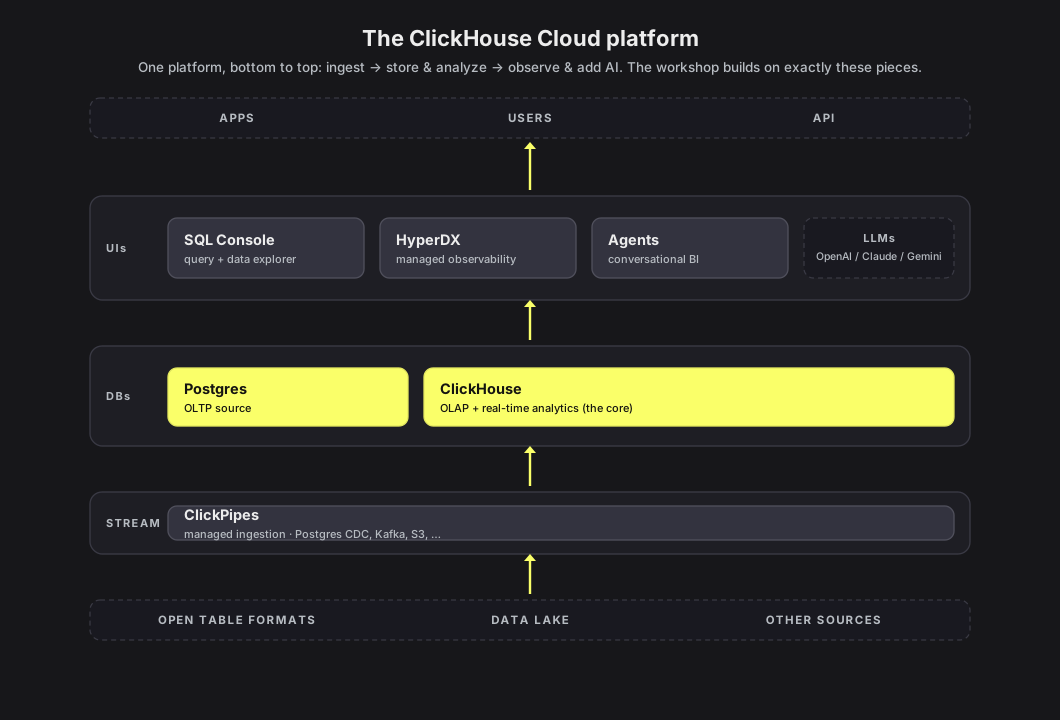
Architecture (target end state)
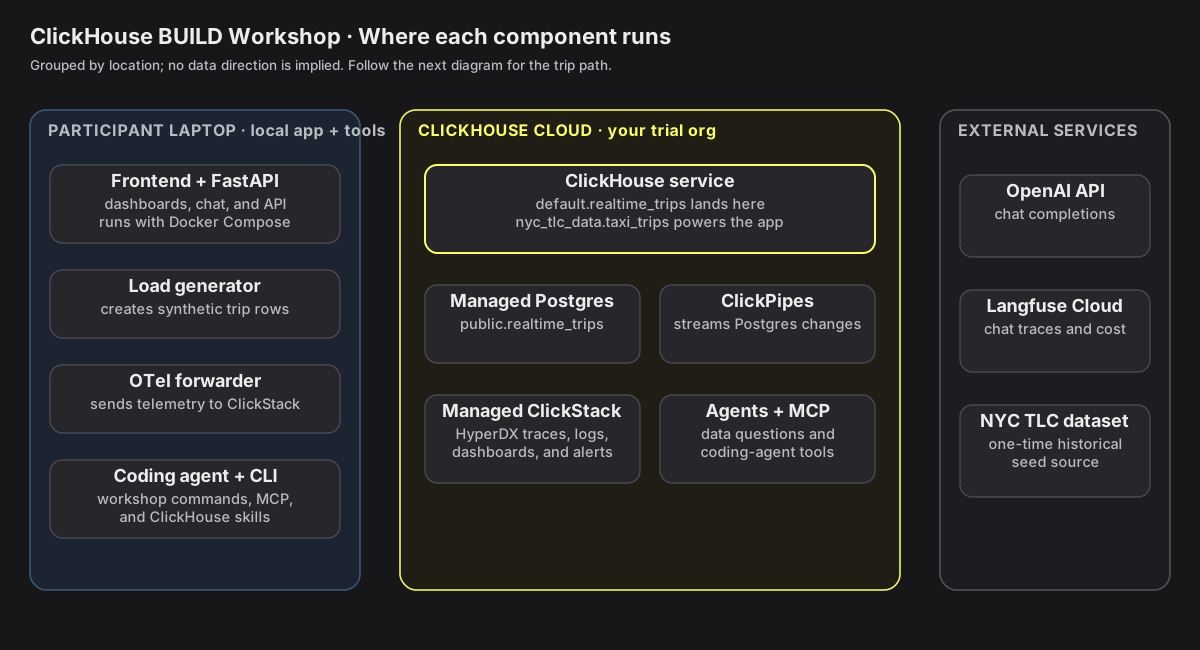
First, group the pieces by where they run: the stateless app and tools on your laptop, stateful services in ClickHouse Cloud, and the separate hosted AI services.
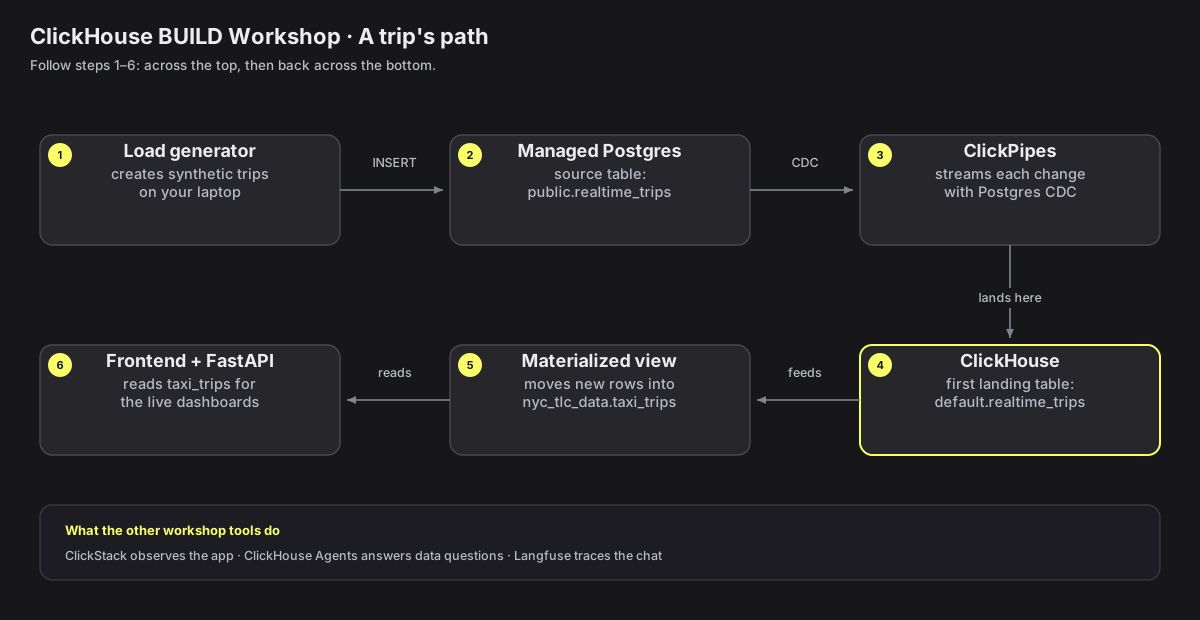
How data flows
Now follow one live trip from the local load generator through managed Postgres and
ClickPipes, into default.realtime_trips, and finally into the application dashboards.
The diagrams above are generated from workshops/build_workshop/docs/diagrams/gen_diagrams.py
(edit the script and re-run it to regenerate the SVGs) — see the module flow below.
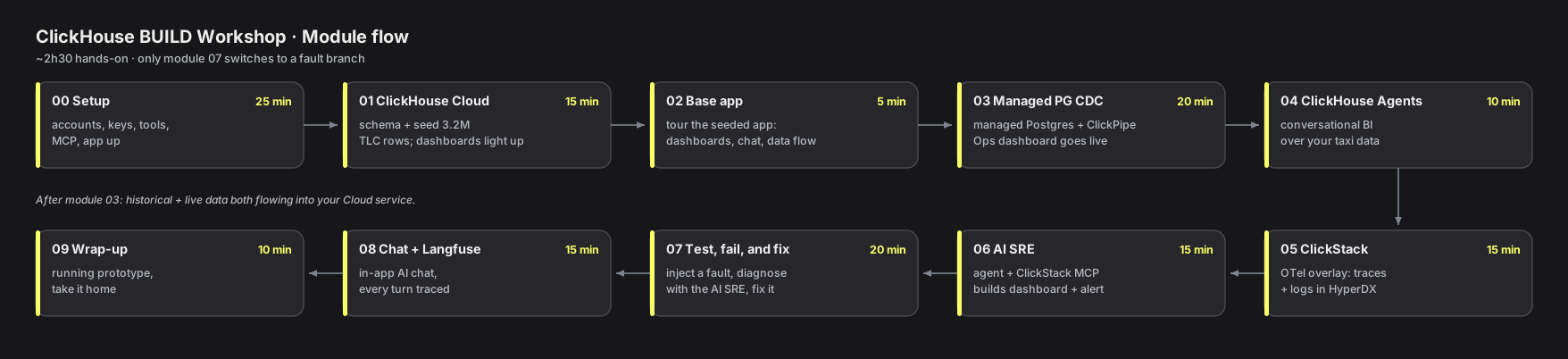
Modules
Ten core modules, in order. The app is complete on build-workshop-v1, so every module except
07 needs no per-module checkout — you configure and connect services rather than change
app code. The only branch switches are the fault branches in module 07.
| Step | Time | Learner lesson | Instructor notes | Branch | What you will learn |
|---|---|---|---|---|---|
| 00 | 25 min | Setup | notes | build-workshop-v1 | Accounts, tools, agent skills, and the app repo, all wired up and verified |
| 01 | 15 min | ClickHouse Cloud | notes | build-workshop-v1 | Create the schema, seed historical data from object storage, and feel the query speed |
| 02 | 5 min | Base app | notes | build-workshop-v1 | Tour the running app now that it has data: Ops and Historical dashboards, the chat panel, the data flow |
| 03 | 20 min | Managed Postgres CDC | notes | build-workshop-v1 | Stream live rows from ClickHouse-managed Postgres into ClickHouse with a Postgres CDC ClickPipe |
| 04 | 10 min | ClickHouse Agents | notes | build-workshop-v1 | Conversational BI: create an agent over your taxi data and explore it in natural language |
| 05 | 15 min | ClickStack | notes | build-workshop-v1 | Enable ClickStack and send app traces and logs to HyperDX |
| 06 | 15 min | AI SRE | notes | build-workshop-v1 | Use the ClickStack MCP connection to build an SRE dashboard and alert |
| 07 | 20 min | Test, fail, and fix | notes | fault/* | Continue from AI SRE, inject a fault, diagnose it, fix it, and prove recovery |
| 08 | 15 min | Chat and Langfuse | notes | build-workshop-v1 | Use the in-app AI chat and follow its traces, generations, and costs in Langfuse |
| 09 | 10 min | Wrap-up | notes | build-workshop-v1 | Review what you built, take it home, and extend it to your own data |
The times add up to about 2 hours 30 minutes of hands-on work; the rest of the three-hour session is the opening, transitions, and the finale demos.
How to work through it
Branches
The app is already complete on build-workshop-v1. This workshop is about configuring
and connecting services — real-time CDC, observability, agents, chat — not editing
application code, so there is nothing to build up branch by branch:
- Clone the app once in module 00, switch to
build-workshop-v1, and stay there except while running the fault scenarios in module 07. - Late joiners are never stranded: managed resources are service-side, and the complete
local app restarts from the workshop branch plus
.env.workshop. There is no per-module checkout to catch up on. - The only branch switches are in module 07 (Break and fix), which uses fault branches
(
fault/01-map-not-loading,fault/02-zone-stats-500,fault/03-slow-dashboard). You check one out, diagnose the failure, then preserve the fix and return tobuild-workshop-v1with the module 07 stash-and-switch reset.
Fault branches
The three fault/* branches above exist in the repo; module 07 walks through checking
one out. Their symptoms and fixes are documented in the instructor track's answer key.
Environment variables
Workshop configuration lives in a single .env.workshop file at the root of the app
repository. A safe .env.workshop.example is committed; copy it and fill in only the
values that are yours:
cp .env.workshop.example .env.workshopThe stack reads it explicitly via --env-file:
docker compose --env-file .env.workshop -f docker-compose.workshop.yml up -dYou fill in the values during module 00 setup, except the ClickStack block, which you add in module 05:
CLICKHOUSE_HOST,CLICKHOUSE_PASSWORD(plusCLICKHOUSE_PORT=8443,CLICKHOUSE_USER=default,CLICKHOUSE_DATABASE=nyc_tlc_data,CLICKHOUSE_SECURE=true) — your Cloud service (module 00).CLICKHOUSE_HOSTis the bare hostname, with no scheme and no port.OPENAI_API_KEY,LLM_MODEL=gpt-5.4-mini,LLM_BASE_URL— the runtime LLM for the in-app chat (module 00).LANGFUSE_PUBLIC_KEY,LANGFUSE_SECRET_KEY,LANGFUSE_BASE_URL— your Langfuse project (module 00).LANGFUSE_BASE_URLis the Langfuse v4 env name; usehttps://us.cloud.langfuse.com(US) orhttps://cloud.langfuse.com(EU).OTLP_AUTH_TOKEN,CLICKSTACK_DATABASE=otel,OTEL_SERVICE_NAME=nyc-taxi-backend— observability, in the ClickStack section of the same.env.workshop(module 05).
Never commit your filled-in .env.workshop; it is git-ignored.
Repository layout
Everything lives in one repository (ClickHouse_Demos), on the build-workshop-v1
branch. Every workshop's lab code lives under workshops/, so the app you build on
is workshops/build_workshop/; the published playbook you are reading lives in the
shared site at the repository root, site/, which also serves the Agent Arena
workshop and the static RTA guide.
site/                           # the shared Next.js + Fumadocs site (all workshops)
  content/docs/build-workshop/  # this playbook (the site you are reading)
    index.mdx                   # this overview
    learner/                    # self-paced guide, the lessons 00-setup ... 09-wrap-up,
                                #   and a troubleshooting reference
    instructor/                 # facilitator notes: 00-setup ... 09-wrap-up
  src/                          # Next.js + Fumadocs app
  README.md                     # run, build, deploy, and authoring guide

workshops/build_workshop/
  app/                         # the NYC-taxi app you build on (cloned in module 00)
    frontend/                  # React SPA (Ops + Historical dashboards, chat panel)
    backend/                   # FastAPI analytics API + AI chat
    db/cloud/001_cloud_schema.sql   # maintainer fixture; Module 01 contains the copyable SQL
    docker-compose.workshop.yml     # the workshop stack (Cloud + ClickPipes)
    docker-compose.otel.yml         # the ClickStack observability overlay (module 05)
    .env.workshop.example      # single env template (Cloud + chat + observability);
                               #   copy to .env.workshop and fill in your values