07 Ask your data a question
Use the SQL console's built-in agent against the schema you designed, and see why the answers are only as good as the columns you gave it to reason about.
Outcome
Nothing to install, nothing to configure. Open the SQL console you have been using all workshop, find the agent built into it, and ask it three questions about the data you have spent the last several modules shaping. What comes back is the payoff for every column name and every type you chose earlier -- or the cost of not choosing, if you point it at the wrong table.
Open the agent
In your ClickHouse Cloud SQL console, look for the assistant built into the query editor -- typically an icon or a chat panel alongside the query pane, depending on your console version. It reads your schema (table and column names, types, and comments) and can propose and run SQL against it from a plain-English question. There is nothing to sign up for beyond the service you already have, and nothing runs outside the console.
Three prompts to try
Ask these against the tuned table or view you built for the earlier challenges -- the one with
real column names like geo_country, device_category and event_name, not the naive import
from module 03.
Which country has the highest cart-to-purchase drop-off, and how many users does that
represent?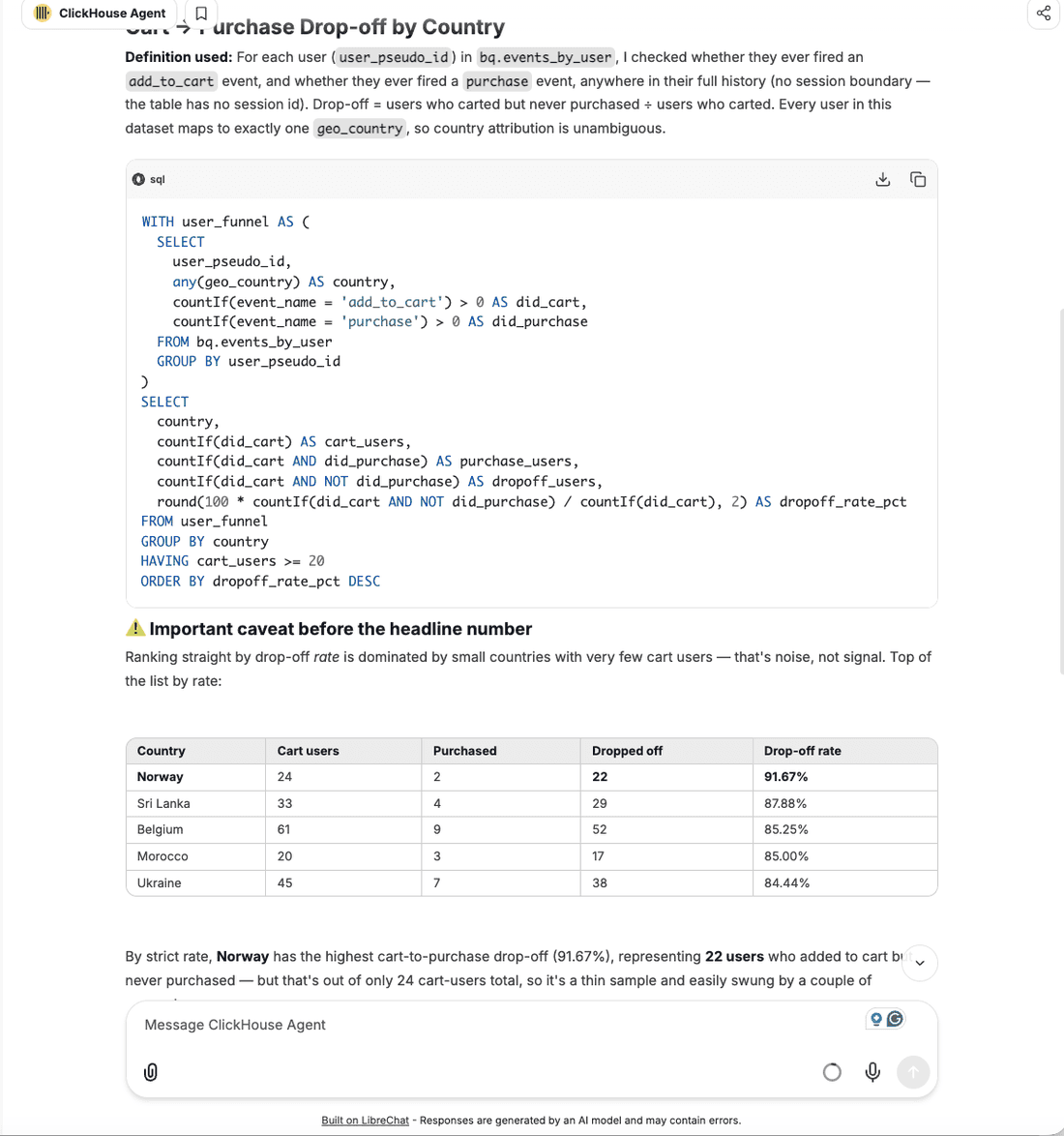
Break down purchases by device category and traffic source. Where is conversion strongest?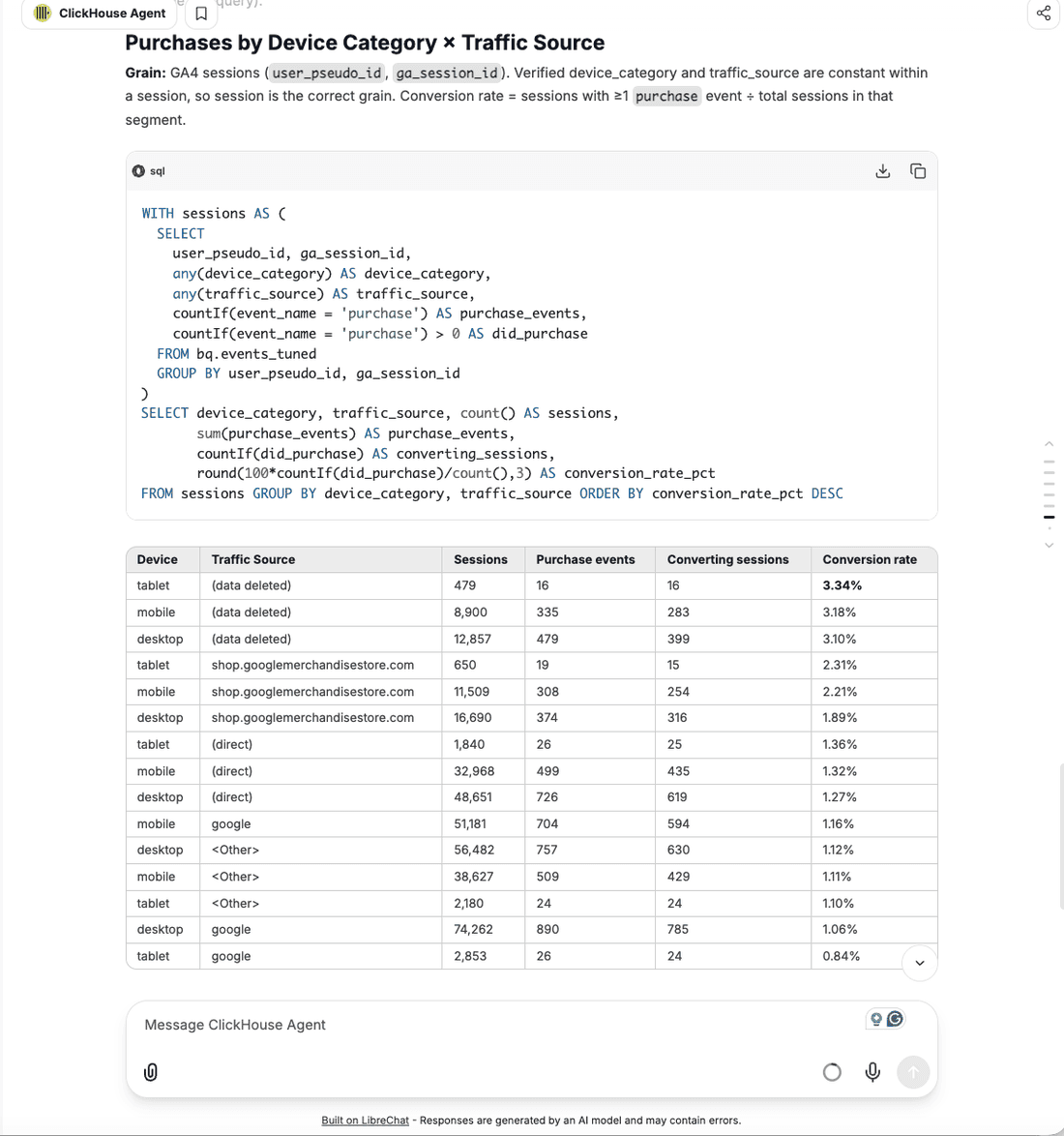
The third prompt is the one that matters most. The first two ask the agent to write a query against data it can already see; this one asks it to reason about a design decision instead -- which is where the last two hours of schema work actually pays off.
I want this funnel on a customer-facing dashboard refreshed every ten seconds for a few
thousand concurrent users. What in my schema would I change?
A good answer touches concurrency and freshness at a scale BigQuery's own architecture cannot serve the same way, and it lands the coexistence message this workshop has been building toward without needing a slide to say it. That is the difference between "the agent wrote SQL" and "the agent reasoned about my schema".
Read the SQL a prompt generates before you trust the answer, the same way you would review a
colleague's query. Check it against numbers you already know are right -- the funnel counts
from module 02 (view_item 386,068, add_to_cart 58,543, begin_checkout 38,757, purchase
5,692) are a fast sanity check on whether a generated query's WHERE event_name = ... clause
matches what you expect.
Why the answers are only as good as the schema
Try the same three prompts again, this time pointed at bq.events_naive from module 03 --
every column Nullable, geo a nested tuple instead of a flat geo_country, device the
same. The agent has nothing clean to reason about: no column named anything a plain-English
question maps onto, no type that tells it a value is a country rather than an arbitrary
string, nested structures it has to guess how to unnest correctly.
This is not a limitation of the agent. It is the same lesson the compression and sort-key challenges already taught from a different angle: a schema that says what it means, in typed, named, flattened columns, is easier for anything reasoning over it -- a person, a query planner, or an agent -- to get right on the first try. A table of nullable strings gives it nothing to work with, and the answers it gives back reflect exactly that.
If the agent is not available
Some trial services do not have the console agent enabled. If yours does not, this is an instructor-driven module for your session: the instructor runs the same three prompts against their own service, live, and shows both the generated SQL and the result on screen. The prompts above are plain text -- copy them, and once your own service has the agent enabled (or during a later session that does), run them yourself and compare what you get back.
Done when
You have asked at least one of the three prompts against your tuned schema, read the SQL it
produced, and can say in one sentence why the same question against bq.events_naive would
give the agent less to work with. Continue to
08 Your real migration.