00 Setup
Get your environment ready — OpenRouter, ClickHouse, and Langfuse connected from the start.
Outcome
A cloned repo with a Python virtualenv installed, a .env populated with credentials
for OpenRouter, ClickHouse Cloud, and Langfuse Cloud, an arena database in ClickHouse
Cloud seeded with synthetic e-commerce data, and the local dashboard running at
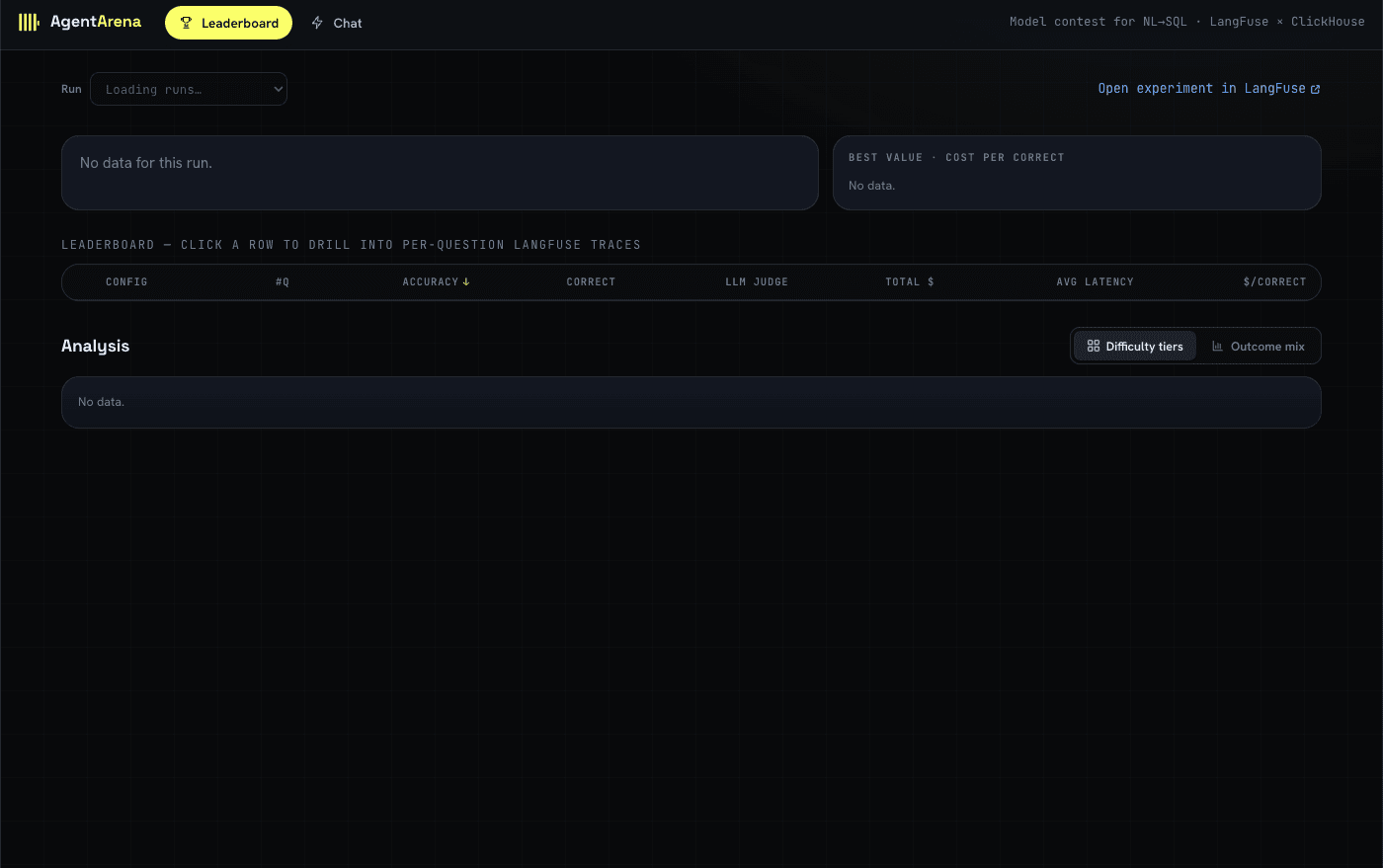
http://localhost:5174 — Leaderboard tab empty for now, that's expected until
Module 01.
Why
One agent core, reused by two callers (the benchmark harness and the serving API); it asks a
model via OpenRouter and reads data through ClickHouse's read-only v_* views.
Langfuse stores each benchmark result and powers the leaderboard through its Public API.
Agent Arena is one NL→SQL agent core (agents/) reused by two callers — the benchmark
harness (eval/harness.py) and the live serving API (serving/api.py) — so the demo
and the benchmark share exactly the same code path: same prompt templates, same model
client, same read-only SQL sandbox. That's what makes the benchmark's numbers
trustworthy predictors of production behavior, rather than a separate "eval harness"
that quietly diverges from what actually ships.
Notice that Langfuse is one of the three accounts you set up in this very first module — before you've picked a model, before you've run a single question. That's deliberate: Langfuse isn't something you bolt on once the chatbot works, it's the tool that runs the contest in Module 01, measures the winner offline in Module 02, detects a production blind spot in Module 03, supports human investigation in Module 04, and proves and monitors the improvement in Module 05 — one project, one continuous evidence trail. Every module after this one builds on that one code path and that one Langfuse project, so getting the three accounts and the seeded database right here is what makes the rest of the workshop just work.
Concepts — under the hood
Three pillars, three jobs, wired together from this first module:
- OpenRouter — one OpenAI-compatible API in front of every model family in this
workshop (Anthropic, OpenAI, Google, DeepSeek, Qwen, Z.ai).
Instead of juggling six provider SDKs and six sets of credentials, the agent core
(
agents/) speaks one client to reach all six models inconfig.yaml. That's what makes a fair, apples-to-apples contest in Module 01 possible: every model is onemodel=string away, behind the same endpoint, the same request shape. - ClickHouse — the application database. It holds the business data (the
synthetic e-commerce tables you're about to seed) behind the
v_*views. The agent is only ever allowed toSELECTfrom thev_*views — never the raw tables, never write — both because that's a stable, documented read-only contract for the agent to reason about, and becauseagents/sqlguard.pyenforces it as a SELECT-only sandbox: it parses the generated SQL and rejects anything that isn't a singleSELECT/WITH…SELECTstatement, and blocks a denylist of write/DDL keywords (INSERT,UPDATE,DELETE,DROP,ALTER,SYSTEM, …) even inside an otherwise-valid statement. - Langfuse — the eval, leaderboard, and observability store. It's connected now, before you've picked a model or asked a single question, because it isn't a bolt-on for later — it's the tool that grades the contest in Module 01, lets you drill into quality in Module 02, detects production failures in Module 03, carries the human review in Module 04, and validates future traffic in Module 05. One project, one continuous trail of traces, feedback, scores, annotations, and datasets.
Screenshot: the Langfuse Cloud project's Settings → API Keys page, showing where
the public/secret key pair you paste into .env comes from — capture from the live UI.
Pitfall — placeholder OPENROUTER_API_KEY. .env.example ships OPENROUTER_API_KEY=sk-or-...
as a template, not a real key. If you forget to overwrite it, every model call in
Module 01 fails with an OpenRouter auth error, not a ClickHouse or Langfuse error — so
check .env first if that's what you see.
Pitfall — wrong ClickHouse host or region. CLICKHOUSE_CLOUD_HOST must be the exact
host from your service's connection details (region-specific, e.g.
abc123.us-east-1.aws.clickhouse.cloud), not the generic clickhouse.cloud domain.
A mismatched host fails fast with a DNS/connection error during scripts/arena.sh up —
that's the signature to recognize.
Pitfall — ARENA_RO_PASSWORD mismatch. scripts/arena.sh up creates the arena_ro
read-only user using whatever ARENA_RO_PASSWORD is set to at that moment. If you
change the value in .env afterward without re-running setup (or dropping and
recreating the user), the agent's read-only connection starts failing to authenticate
even though .env "looks right."
Goal
Three sets of credentials in .env, a seeded arena database with the v_* views the
agent will query, and the local dashboard reachable in a browser.
Step 1 — Create three accounts
You need API credentials from three services before you touch the terminal:
| Service | What you need | Where to get it | .env var(s) |
|---|---|---|---|
| OpenRouter | An OPENROUTER_API_KEY | openrouter.ai → Keys. OpenRouter fronts every model family used in this workshop (Anthropic, OpenAI, Google, DeepSeek, Qwen, Z.ai) behind one OpenAI-compatible API. | OPENROUTER_API_KEY, OPENROUTER_BASE_URL |
| Langfuse Cloud | A project's public + secret key | cloud.langfuse.com → create a project → Settings → API Keys. | LANGFUSE_PUBLIC_KEY, LANGFUSE_SECRET_KEY, LANGFUSE_BASE_URL |
| ClickHouse Cloud | Host, admin user, admin password | clickhouse.com/cloud → create a service → connection details. | CLICKHOUSE_CLOUD_HOST, CLICKHOUSE_CLOUD_USER, CLICKHOUSE_CLOUD_PASSWORD |
Keep all three handy — you'll paste them into .env in a moment.
OpenRouter privacy setting required for Qwen
In OpenRouter, open Settings → Privacy → Data Policies → Zero Data Retention and
turn Non-frontier off (the toggle must be grey/off). Qwen is in OpenRouter's
non-frontier model group, and its available Alibaba endpoint is not eligible when
non-frontier Zero Data Retention is enforced. If this remains enabled,
qwen/qwen3.7-flash fails with No endpoints available matching your guardrail restrictions and data policy even when the API key and model slug are valid.
This workshop sends synthetic e-commerce questions and schemas. For real workloads, review your organization's privacy requirements before relaxing a ZDR policy.
Step 2 — Clone the repo
Agent Arena lives inside the ClickHouse_Demos monorepo, under workshops/agent_arena on
the build-workshop-v1 branch.
Clone the whole repo, then move into that subdirectory — every command from here on
assumes you're standing in it:
git clone --branch build-workshop-v1 --single-branch https://github.com/ClickHouse/ClickHouse_Demos.git
cd ClickHouse_Demos/workshops/agent_arena
Step 3 — Create a virtualenv and install dependencies
python3.11 -m venv .venv && source .venv/bin/activate && pip install -r requirements.txtStep 4 — Configure .env
Copy the example file:
cp .env.example .env.env
Fill in the values from Step 1 — every value below is empty or a placeholder in
.env.example:
# ClickHouse Cloud (business data queried by the agent)
export CLICKHOUSE_CLOUD_HOST=xxx.clickhouse.cloud
export CLICKHOUSE_CLOUD_USER=default
export CLICKHOUSE_CLOUD_PASSWORD=
export CLICKHOUSE_CLOUD_DATABASE=arena
export ARENA_RO_PASSWORD=
# OpenRouter (LLM provider)
export OPENROUTER_API_KEY=sk-or-...
export OPENROUTER_BASE_URL=https://openrouter.ai/api/v1
# Langfuse Cloud (eval store + tracing)
export LANGFUSE_BASE_URL=https://us.cloud.langfuse.com
export LANGFUSE_PUBLIC_KEY=pk-lf-...
export LANGFUSE_SECRET_KEY=sk-lf-...
What each block is for:
CLICKHOUSE_CLOUD_*— your ClickHouse Cloud service's admin credentials. Setup uses the admin user once, to create thearenadatabase and a dedicated read-only user (arena_ro) that the agent queries through for the rest of the workshop.ARENA_RO_PASSWORD— pick any password; it becomesarena_ro's password when the read-only user is created.OPENROUTER_*— your OpenRouter key and its base URL. Every model inconfig.yamlis addressed through this one endpoint.LANGFUSE_*— your Langfuse Cloud project's host and keys. This is where every trace, score, and dataset in the workshop lives, from the first Arena run in Module 01 through the monitored improvement in Module 05.
Step 5 — Seed ClickHouse with synthetic e-commerce data
This creates the arena database, the arena_ro read-only user, generates synthetic
e-commerce data (customers, products, orders, order items, events) directly into
ClickHouse, and builds the v_* views the agent queries against:
source .env && scripts/arena.sh upEvery agent, prompt, and piece of golden SQL in this workshop queries the
v_customers, v_products, v_orders, v_order_items, and v_events views — never
the raw tables.
scripts/arena.sh up also starts the local dashboard API and web UI. When
it finishes, open http://localhost:5174 — the Leaderboard tab will be empty until
you run the contest in Module 01.
What a healthy run looks like. scripts/arena.sh up prints, in order:
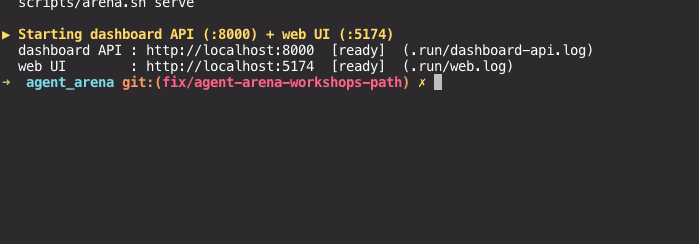
ClickHouse: business database + read-only agent user— thearenadatabase and dedicatedarena_rouser get created.Seeding ClickHouse directly + views + schema context— oneclickhouse: inserted <N> into <table>line per table (customers,products,orders,order_items,events), thendone, then thev_*views and the schema context the agent reads get built.Starting dashboard API (:8000) + web UI (:5174)— two[ready]lines. If either says[NOT up], the port is probably already taken; check the log path it prints (.run/dashboard-api.logor.run/web.log).
You can re-check any of this later with scripts/arena.sh status, which prints
whether the servers are up and the row count of each v_* view.
How to verify you are done
.envhas real values (not placeholders) forCLICKHOUSE_CLOUD_*,OPENROUTER_*, andLANGFUSE_*.scripts/arena.sh upfinished without error.http://localhost:5174loads in a browser, showing a Leaderboard tab (empty is correct for now).
Exercise — break and diagnose a connection
Learn to recognize a broken .env value by its failure signature, on purpose, while
the stakes are zero:
- Open
.envand change one character inARENA_RO_PASSWORD(or temporarily comment it out). - Re-run
source .env && scripts/arena.sh up. It should still get through the ClickHouse admin steps (those use the admin credentials), but watch for where the read-only path — anything that connects asarena_ro— starts complaining. - Read the error message closely: is it an authentication error, a "user does not exist" error, or silence followed by a timeout? Note which one you got.
- Restore the correct
ARENA_RO_PASSWORDand re-runscripts/arena.sh up. Confirm it completes cleanly again.
This is the same diagnostic instinct you'll want later when a teammate's setup "isn't working" — matching the error text to which of the three services is misconfigured, instead of re-checking everything.
Wrap-up
You have a seeded ClickHouse database, credentials for all three services — including Langfuse, connected before any model has been chosen — and the local dashboard running. Everything after this module reuses this same environment and this same Langfuse project; no further setup steps.
End state
Environment ready. Continue to 01 Select the base model to run the contest against this data.