05 Create your pricing strategy agent
Build a specialized managed agent that queries, recommends, and reassesses.
Outcome
Create Retail Pricing Strategist in managed ClickHouse Agents. Ask it to investigate opportunities, inspect its SQL, approve a recommendation yourself, and ask it to assess the outcome.
Starting point
Complete Module 04. Keep your ClickHouse service and writer available.
Actions
1. Create the specialized agent
- In ClickHouse Cloud, select ClickHouse Agents, then Launch.
- Open the agent builder and select Create New Agent.
- Name it Retail Pricing Strategist and choose an available model.
- Under Tools, select Add tools. In Tool Library, find ClickHouse under MCP servers and add it to the agent. Confirm ClickHouse appears in the agent's Tools list; No tools yet means it cannot query your database.
- Check that the ClickHouse connection targets your workshop service and has read-only access to its
pricingdatabase. - Paste the following instructions into the agent's instructions field.
You are Retail Pricing Strategist for this synthetic convenience-store chain.
Use the connected ClickHouse tool to investigate perishable goods before expiry.
Execute database queries through the attached ClickHouse tool. SQL code blocks and
written result tables are not tool execution. Never invent connection identities,
settings, run IDs, timestamps, model versions, or query results. If the tool is absent
or unavailable, stop and report that the ClickHouse connection is missing. Do not
claim a request ran unless an actual tool response is available.
For an opportunity-and-strategy request, continue through context, opportunities,
and price comparison in the same turn. Stop only after a supported recommendation
or a specific blocker such as stale data, no eligible stock, or a query error.
Read retail_analysis_context before selecting a run, cutoff, and model version.
Find opportunities with retail_opportunities and compare permitted prices with
retail_price_comparison. Include unchanged pricing. Optimize incremental profit
and report revenue, units, waste, uncertainty assumptions, and data freshness.
Show your SQL and the results supporting the recommendation. If data is missing,
stale, or a query fails, explain the missing evidence; do not invent a result.
Give the learner the store, product, cutoff, model, and price to review in the
workbench. Application requires their approval there. After they apply a price,
query its acknowledged receipt and observed outcomes before reporting the change.

Use the attached data dictionary and pricing policy. Use only the selected workshop
ClickHouse service and its `pricing` database. Select explicit columns, one district
and one closed cutoff, and use LIMIT. The connection must enforce read-only access,
a 30-second execution limit, a 200-million-row scan limit, a 10,000-row result limit,
and a 2 GB query memory limit. Overflow must throw; partial rankings are not evidence.
Do not loosen these settings, create objects, write rows, or apply a price.

Before the first analysis, query `currentUser()` and `currentRoles()` and show the
connection identity. Do not claim a profile protects the connection until its actual
identity has the expected limits. Cloud RBAC and the connected identity determine
authority; a prompt is not an access control.

Investigate one district at a time. Keep the original cutoff fixed while comparing
prices. Explain non-ready eligibility rather than assigning missing demand to zero.
Use the prepared sensitivity scenarios; do not fit a new model or create an ad-hoc
forecast in conversation. If there is no positive uplift, recommend keeping the
current price. Describe this as the best modeled permitted option, not a proven
optimal real-world price. Recheck context and subject evidence before handing off.

Return a compact table with store, SKU, cutoff (UTC), model version, current price,
proposed price, expected units, revenue, waste, net recovery, contribution, and
incremental profit versus unchanged pricing. State SGD and convert minor units by
100. Show uncertainty assumptions and the SQL/tool results supporting every figure.
The learner reviews the proposal in the workbench, whose server checks source
versions before application. After approval, request the receipt UUID from the learner
and query the receipt-scoped observed series. Distinguish projected demand from
observed generated events. The unchanged-price branch is a synthetic comparison,
not a randomized experiment on real customers.
Attach agent/retail-data-dictionary.md and agent/retail-pricing-policy.md from your checkout as context files. Save the agent, start a new chat with it, and run the connection check below. If an earlier chat ran without tools, do not reuse its claimed results.
Give the agent business context
The dictionary explains the tables, time boundaries, units, and parameterized views. The policy defines the objective and approval boundary. The managed model and connected ClickHouse tools supply reasoning and data access; you do not run a separate agent process on your laptop.
2. Check the connected identity and limits
Ask the agent:
Show currentUser(), currentRoles(), and the effective readonly,
max_execution_time, max_rows_to_read, max_result_rows, max_memory_usage,
read_overflow_mode, and result_overflow_mode settings through your
connected ClickHouse tool. Execute the query now and show the actual tool
response. If no ClickHouse tool is attached, stop and say so; do not provide
example settings or invented results. Identify the service and database.
Check the actual connection is read-only and bounded. The workshop's SQL role is pricing_retail_reader; a role only protects sessions that actually use it. Your connected identity and Cloud permissions determine access.
Before continuing, confirm the conversation contains a real ClickHouse tool call and its returned result. A SQL code block followed by a written table does not establish a connection. Run the same identity/settings query in SQL console using the same database identity to verify it independently; another user's settings do not verify the agent connection.
3. Ask for a chain opportunity and a strategy
Execute this complete investigation using the attached ClickHouse tool.
Read the current run, cutoff, delivery age, and model from the database.
In district 1,
find five store/product pairs with the most excess stock. For the highest
eligible opportunity, compare every permitted price including unchanged
pricing. Recommend the highest modeled incremental profit. Show SQL,
units, revenue, waste, profit, and sensitivity assumptions. Give me the
store, SKU, cutoff, model, and price to review in the workbench.
Continue through all queries in this turn rather than stopping after context.
If a tool or query fails, report the blocker and stop without inventing results.
Expect three stages: a context result, five ranked opportunities, and a permitted-price comparison for one eligible product. A context table alone does not complete this step. If the tool reports stale data or no eligible stock, use that reported blocker before attempting a recommendation.
Inspect the tool calls. Look for pricing.retail_analysis_context, pricing.retail_opportunities, and pricing.retail_price_comparison. Check the agent retained the same cutoff across the comparison and did not invent a number when evidence was unavailable.
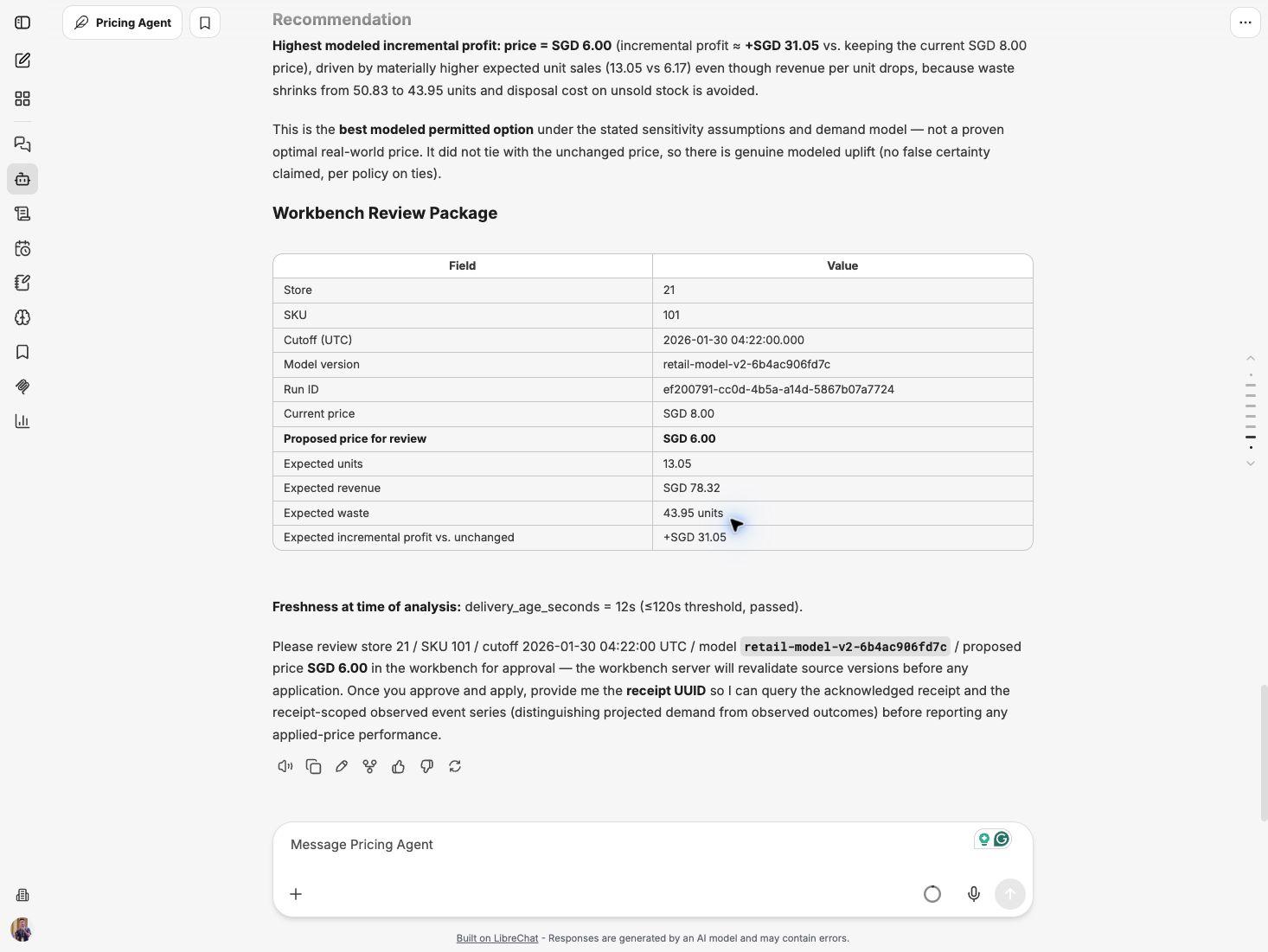
In this example, the agent's Workbench Review Package identifies the store, SKU, run, cutoff, model, and proposed price to review. SGD 31.05 is the projected improvement over keeping SGD 8.00, not total profit. The sales, revenue, and waste figures are forecasts until expiry. Your product and results may differ as sales arrive.
ClickHouse calculates the price scenarios; the agent selects and explains the recommendation. Verify its SQL in the next step, then review a fresh comparison in the workbench before approval.
4. Verify one result independently
- Copy the agent's comparison SQL into SQL console and run it promptly after the response.
- Compare the price, expected units, revenue, waste, and profit change with the agent's table. Minor-unit money columns in its SQL must be divided by 100 to compare with SGD.
- Check that the store, SKU, run, cutoff, and model match before comparing numbers.
An old cutoff can return no rows
The comparison view only returns products with eligibility = 'ready'. The delivery-age check uses elapsed wall-clock time since the batch at the requested cutoff was acknowledged. After 120 seconds, an old cutoff can report waiting_for_cdc even while newer batches arrive successfully. Keeping the same cutoff does not preserve readiness indefinitely.
If the copied SQL returns no rows, keep the writer running and run the query below. Change only selected_store and selected_sku to your agent's chosen product; Store 21 / SKU 101 matches the screenshot. The query selects the latest run, cutoff, and model automatically and returns prices in SGD.
WITH
 21 AS selected_store,
 101 AS selected_sku,
 (SELECT tuple(run_id, cutoff, model_version)
  FROM pricing.retail_analysis_context LIMIT 1) AS context
SELECT tupleElement(context, 1) AS run_id,
 tupleElement(context, 2) AS cutoff,
 tupleElement(context, 3) AS model_version,
 selected_store AS store_id, selected_sku AS sku,
 price_minor / 100 AS price_sgd, units AS expected_units,
 receipts_minor / 100 AS expected_revenue_sgd,
 waste_units AS expected_waste_units,
 contribution_minor / 100 AS expected_contribution_sgd,
 incremental_profit_minor / 100 AS profit_change_sgd, recommended
FROM pricing.retail_price_comparison(
 run=tupleElement(context, 1), store=selected_store, sku=selected_sku,
 cutoff=tupleElement(context, 2), model=tupleElement(context, 3))
ORDER BY price_minor LIMIT 20;
This is a fresh calculation, so its numbers may differ from the screenshot. Ask the agent to rerun its comparison using the run, cutoff, model, store, and SKU returned by this query, then compare the results promptly. If that cutoff has also aged past 120 seconds, refresh both calculations again. An empty result is incomplete evidence, not a recommendation to change the price. If fresh context still returns no rows, ask the agent to query retail_opportunities for the product and report its eligibility before continuing.
Explain one reason an agent needs explicit time, scan, and result limits. A query that stops with an overflow error has incomplete evidence; partial output cannot support a complete ranking.
5. Apply the price in the workbench, then return to the agent
First, switch from ClickHouse Agents to the pricing workbench at http://localhost:8080.
- Open Opportunities and find the store and SKU from the agent's recommendation.
- Open Compare prices and review the fresh comparison for that product.
Why the workbench can show different forecasts
Compare the workbench's Evidence cutoff (UTC) with the cutoff in the agent's response. The agent reports its captured calculation; opening a fresh workbench comparison uses newer evidence. As business time advances, less selling time remains before expiry. Recent demand, stock, or prices may also change. ClickHouse recalculates expected units, waste, recovery, and profit from those inputs.
For example, these two comparisons concern Store 21 / SKU 101, both with 57 units in stock:
| Measure | Agent at 04:22 UTC | Workbench at 04:34 UTC |
|---|---|---|
| Recommended price | SGD 6.00 | SGD 6.00 |
| Expected units at SGD 6.00 | 13.05 | 12.5 |
| Expected waste | 43.95 units | 44.5 units |
| Net recovery | SGD 53.74 | SGD 50.40 |
| Profit change versus SGD 8.00 | +SGD 31.05 | +SGD 29.79 |
The workbench has 12 fewer business minutes before expiry. The recommendation remains SGD 6.00, while its projected outcome has changed. The workbench also displays units rounded to one decimal place; compare unrounded SQL values when checking calculations.
Before approving: use the workbench's fresh figures to decide whether the proposed price still improves on unchanged pricing. If the recommendation changes or no longer shows a positive improvement, ask the agent to reassess using fresh evidence. Exact numerical verification requires matching the run, store, SKU, cutoff, model, and source versions; Step 4 serves that purpose. Comparing different cutoffs checks whether the recommendation still holds as sales arrive.
- Select Review SGD … for your chosen price, then Approve and apply price.
- Wait for the Price applied: SGD … confirmation. Select View observed results.
- Copy the Receipt ID displayed above the sales chart. This identifies the approved price change; it is different from the run ID in the agent's recommendation.
Now switch back to your ClickHouse Agents conversation. Replace PASTE_RECEIPT_ID below with the full receipt UUID you just copied, then send the message:
I approved the price in the workbench. Receipt UUID: PASTE_RECEIPT_ID.
Query the acknowledged receipt and its observed outcomes. Compare the
applied and unchanged-price branches. Report units, revenue, remaining
stock or waste, and contribution. Explain how this differs from your
forecast and what the synthetic comparison can establish.
Confirm it queries pricing.retail_outcome_series for that receipt. Save the evidence SQL and your conclusion.
Verify
Which parts did ClickHouse compute? Which parts did the agent orchestrate? Where did human approval occur? How did you verify the answer independently?
Next: Review and clean up.